Tuesday, 27 November 2018

4.4 Designing an ICT Activity for my eTwinning Project

ADAM'S STORY

( Creative Writing Activity to improve English with fun)

Aims
1. To improve writing skills in English
2. Creating a PB lesson plan
3. Fostering collaboration between students and teachers
4. Using ICT for collaboration
5. To know more about cultural heritage and respect eachother's culture


1. We will make international groups of 5-6 in Google Docs and share it in Twinspace.

2. We will give them the beginning of a story of Adam (The story is about a man who is travelling the world to find the most valuable cultural object.)

3. In "TRICIDER" tool, we will create a page for each group to disscuss their ideas to complete the story. The students will be given a deadline to decide on their ending. 

4. In "Storyjumper" The groups will complete their stories. There will be rules for the groups for task sharing to make all contibute to the task.

5.After completing the stories, they will share the stories.As teachers, we will make them exchange the stories. Groups will write a poem for the story they are given. They will add it at the end of the story.  

6. We will make them exchange the stories again and the groups will create a "Google Earth Narrated Tour" for the points Adam visited in the story to see the cultural heritage points.( we will publish a tutorial to teach them how to create a tour. It is so easy.)

6. Then, we will share the story links in Twinspace. 

7. We will add this writing activity to our Lesson Plan Portfolio.

4.4 Golden Rules

Golden rules for successful eTwinning collaboration

In any good task or project, there must be rules to follow and fulfill to guarantee its success. Next, we list nine golden rules that will ensure the success of your eTwinning collaborative project.
  1. Get to know your partners: share with your partners all the necessary information, such as the number of students participating in the project, your students’ age and interests, your students’ level in foreign languages and their ICT skills.
  2. Create a detailed time schedule: set the starting dates for each task, mark the dates when one of the partner schools is on holidays, share it with your students, set deadlines and respect them.
  3. Preparatory planning leads to a successful eTwinning project: plan a meeting, introduce the project to the children and inform the parents, the colleagues and the headteacher about the specific project; add more teachers from your school to the project and form school teams; announce the beginning of the project on the school website; create Twinspace accounts for all the participants, and invite students to the Twinspace; organise mini-courses for your students on ICT tools to be used, and on how to use the Twinspace; create Twinspace tutorials for students or partners who are beginners in eTwinning (if necessary).
  4. Design your Twinspace carefully: create activity pages for each one of the planned tasks, add a short description for each one of the activities planned at the top of each activity page, agree with your partners about the most suitable tools for each one of the activities, and add them to your activity pages.
  5. Break the ice and get to know each other: have students interact as much as possible, ask them to update their Twinspace profiles by adding a short description of themselves, and a representative avatar. Ask them to leave comments on their partners’ walls, and to vote for the best Twinspace profiles. Plan chat sessions and skype meetings regularly. Find creative ways to have your students introduce themselves and their school or country.
  6. Team your students up in Transnational Groups: team students up in transnational groups, create a table with the newly formed transnational groups and add it to the Twinspace. Ask your students to work together and write a short description of their group members. Ask your students to also agree upon a name for their group and draw together a symbol or an emblem for each group.
  7. Plan as many collaborative activities as possible: try to plan activities that need your partners’ contribution to be completed. Use as many collaborative tools as possible (Google suite, DrawitLive, Glogster, etc.). Try to avoid creating folders for each country in Twinspace (successful collaborative activities are the ones in which you cannot tell which of the partners did what!).
  8. Assign responsibilities to your students: discover your students’ talents and skills and give them responsibilities. Team the students up in groups, according to their talents (the painting group, the photography group, the ICT group, etc.), and assign to some students the role of "student administrator" in Twinspace.
  9. Set Evaluation Criteria: try to evaluate the quality of your project along with your partners. Recognize Key Strengths, and identify areas that need improvement. Plan ongoing evaluation activities (share opinions, make proposals, comment on each other’s work).
These golden rules will make an eTwinning project a successful experience, since they promote collaboration between partners, PBL methodology and the change of role of the teacher and students. Remember that it is important to clearly indicate to the students what they have to do, how they must do it and when they have to do it, designing the phases of the activity very clearly. This will facilitate their autonomy and the development of skills. In these new processes, we must emphasize the fact that we have to facilitate and provide opportunities for the students to work as a team, both among them, in the classroom, and with their distant partners.

4.3 e-collaborative tools

E-COLLABORATIVE TOOLS

https://www.symbaloo.com/mix/cajadeherramientas35

Module 4 Collaboration in eTwinning

4.2 Collaborative Working

Here is my last collaborative activity in my English Classes:

        I'm an English teacher. I have implemented a collaborative writing activity today. We had the beginning of a story in the coursebook. Our task was to complete the story in an imaginative way. I have divided students into groups of 5. (Team rules: Choose a writer, discuss and decide on an end together. While the sts. are writing the story, one-maybe a weak one- will think of a heading) Within a time limit, they finished their stories. Then, we exchanged the stories. They illustrated the the other group's story in a funny way. Later, we exchanged the papers again. And this time, they wote a poem(a stanza) about the story. It was a real fun. This way, all the groups collaborated on eachother's story. Maybe , we can do the same in eTwinning projects :)

Wednesday, 21 November 2018

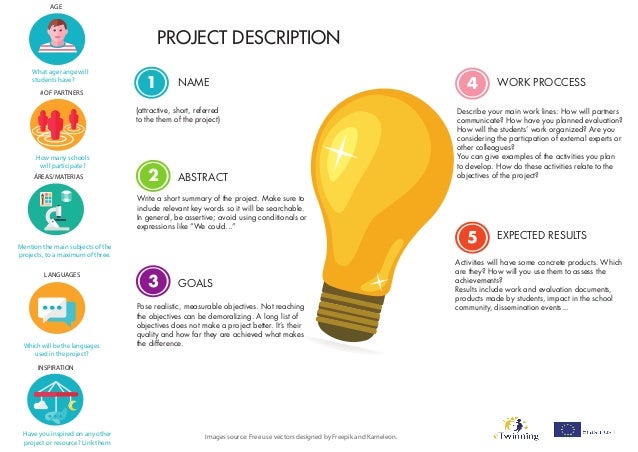
3.2 Start your Project Draft


I will try to prepare a draft of my project idea and share with friends to get assessment for perfection. Later, I will use the suggestions and improve my idea.

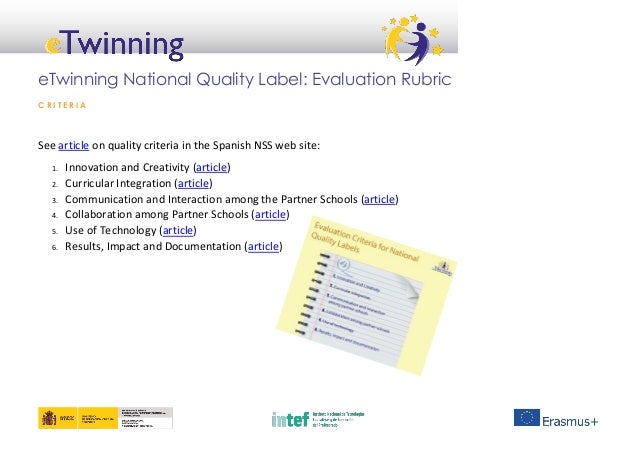
* We can use Project kits on eTwinning platform and Quality Label Rubric to get an idea.

While preparing the draft:

3.1 Which criteria is the most important to you?


               To me, all the criteria for a qualified project can only work with collaboration. Without collaboration, the work cannot be called an eTwinning Project. A team cannot run a project without this criteria. So, partners' willingness to cooperate and awareness of PBL is vital. "Do not work in parallel but collaborate on a shared outcome,help eachother."


??? Can you explain what things you would put in place as part of a project to ensure a high score in that criterium:


            I would put all the documentations that show the partners collaboration such as google docs, international group lists, live events...

MODULE 3: Project Design 3.1 Quality in eTwinning Projects

Thursday, 15 November 2018

My badges at the end of module 2 :))


Conclusions at the end of Module 2


web 2.0 araçları ile ilgili görsel sonucu


I already use some practical web 2.0 tools to prepare educational materials. But, I have added much more to my list thanks to the sharings of my colleagues all around Europe.

I am planning to use most of them in my lessons and my projects.

However, as far as I see, mostly primary school teachers use these innovative tools, which is both promising and dissappointing because we-high school teachers- must also use them to provide effective environment in our classes.

project ideas ile ilgili görsel sonucu


During the module, of course some project ideas are crossing my mind. It is improving the creative side of my mind.:)


web 2.0 araçları ile ilgili görsel sonucu


Monday, 12 November 2018

Linkly

My favourite link for now is

www.canva.com 

and I added this link to Listly to the list of open etwinning list.

Then, I also added the following link with which it is so easy to prepare educational games:

www.learningapps.org

My Best Practices

***Like my other colleagues,I find web 2.0 tools so effective and innovative in my classes. my favourites are

1. Kahoot
2. Padlet
3.Canva
4.Powtoon
5.Emaze

***And I hope to use PBL more in teaching with eTwinning projects.

Of course I shared my opinions with other participants on Facebook:


and on twitter with the hashtag #twinmooc


Analysing my teaching practice

                            To detect strengths and weaknesses in my teaching practice


Module 2: Innovation in the classroom

2.1 Project Management                                             2.2 Searching for experiences


2.3 Innovative Experiences


Sunday, 11 November 2018

#eTwinning280

Which tweets inspired me most and made me think?

" eTwinning is a wing to fly freely."

"It is fun to learn and share in eTwinning and I'd like to have fun :)"

Deadlines and other important dates


My handwriting notes about the course

Course Introduction


Project-Based Learning-eTwinning


What is eTwinning?


Social Media

Twitter

This is what I have shared to reply the question:

WHAT IS eTwinning TO YOU?

Introducing myself by using 'emaze'

The aim of this activity is to get to know each other a little better. We encourage you to introduce yourself to your colleagues in a somewhat more creative way; you can design a multimedia presentation or any digital product, including:
  • 3 things you want us to know about you, one of them related to your experience with PBL and eTwinning;
  • 2 activities that you could not stop doing for anything in the world;
  • 1 dream job you would do if you were not a teacher.

This was our 2nd task to do and I prepared it with a very easy presentation tool emaze

Keys to PBL


This is my first task in the Introduction part. We wrote to answer the following questions:


What is your experience with PBL? Why would you like to implement it in your classroom? Have you faced any difficulties in its implementation? If so, which of the 5 core elements were the most difficult to adapt?

Filiz Çakırlı,Turkey

Hello everyone who is dedicated to teaching! I am an English teacher at a project high school and we have academically high level students but there is something missing in their school life that is PBL. They need to search,communicate,collaborate and create their ideas,solutions, they need to identity themselves. I really feel the need for this in my speaking,writing,listening classes and etwinning projects. The most difficult part is to make activities student driven.I am here to guide them to discover themselves and the world

Hi everyone! I have been teaching English for 16 years in Ankara,Turkey. I have created this blog to share my learnings in Open eTwinning: Project-Based Learning and the Community for Schools in Europe online course provided by academy.schooleducationgateway.eu . As possible as I can, I am trying to join online courses but this will be the longest and -I guess- hardest one for me since it requires a lot of time to follow the lessons and do the tasks. However, I am sure I will learn a lot about PBL( project-based learning) as I have always been trying to be the odd teacher out at my school by seeking innovative and collaborative methods to teach my students not only English but creative and critical thinking.
Meanwhile, I will be sharing my notes, my opinions, my tasks here . Follow me :)))